

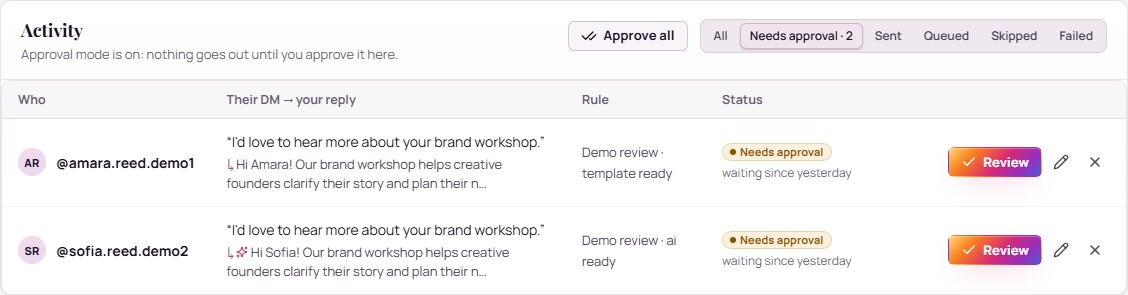
Choose the Instagram automation workflow you need
Start with the task that takes time every week. Answering incoming DMs, preparing outreach, responding to comments and scheduling a post are different jobs. GramFather brings those jobs into one workspace while keeping their controls and queues visible.
- DM automation supports outreach and conversation workflows.
- Comment automation prepares replies to comments on your posts and can draft lead DMs.
- Content planning and scheduling organizes ideas, drafts and publication work.
- Follower tracking records audience changes for review.
- CRM keeps contacts, stages and next actions together.
Use the growth workflow video to see how research, content and engagement connect.
Keep your business context in every conversation
Add your offer, useful facts and examples of your voice before relying on AI drafts. Review the proposed wording and make sure it answers the person’s actual question. Choose review controls in the relevant reply workflow when you want approval before sending.
For example, a coach can prepare answers about program scope and availability, review a prospect’s needs and record the next step in the CRM. This is an illustrative use case. The software supports the work; results depend on the audience, offer and conversation.
Set up a clear operating routine
- Choose a plan that includes the feature you want to use.
- Select your Instagram account in the portal.
- Connect the GramFather Chrome extension and keep Instagram signed in to the matching account.
- Connect your AI provider for AI-assisted features and add business and voice context.
- Review active hours, action limits and the feature’s own settings before enabling it.
- Complete one small workflow and inspect the queue and recorded result before expanding.
Browser actions require an available computer and connected browser session. Instagram restrictions and rate limits apply. These controls manage the workflow; they do not guarantee account safety or uninterrupted execution.
Compare plans around the work you want automated
Starter is $9/month and includes the CRM and follower tracking. Growth is $49/month and adds workflows including campaigns and Comment AI. Pro is $99/month and includes additional capabilities such as Spotlight. Check the full plan comparison for current feature and account allowances.
Each plan starts with a 14-day free trial. A card is required, nothing is charged during the trial, and your chosen plan renews at its stated monthly price afterward. AI provider usage is billed separately. Cancel before day 15 to pay nothing.
Try a real task before expanding your routine
Use the Auto DM tutorial or Comment AI tutorial to inspect a complete workflow. Both include written walkthrough text alongside the video. The demonstrations use fictional teaching data.
Record setup time, how much editing drafts need and whether follow-up work is easier to find. Those observations help you choose the right scope for your account.
Your questions, answered
What can I automate on Instagram with GramFather?
Depending on your plan, GramFather supports outreach campaigns, reply workflows, comment replies, scheduling and related marketing tasks. It also provides CRM and follower tracking. Review the plan comparison for exact scope.
Does GramFather use a Chrome extension?
Browser actions use the GramFather Chrome extension with Instagram signed in. Keep the connected computer and browser available for those actions.
Does Instagram automation guarantee account safety?
Instagram restrictions and rate limits still apply. GramFather offers pacing, hours and review controls, but these do not guarantee that an account will avoid restrictions.
How much does Instagram automation software cost?
GramFather plans are Starter $9/month, Growth $49/month and Pro $99/month. Feature scope differs. Each has a card-required 14-day trial; AI provider usage is separate.
See this workflow in GramFather.
Explore instagram automation software, see the real screens, and choose the plan that fits your business.
Put your next move into practice.
Start your 14-day free trial and put GramFather to work on the workflow that matters most to your business.
Start my 14-day free trialGrowth plan: free for 14 days, then $49/month. Card required, with a temporary authorization hold released immediately; cancel before day 15 and you pay nothing. Compare plans from $9/month. AI provider usage billed separately. Browser actions require the Chrome extension and an available Instagram session. How the free trial works.