

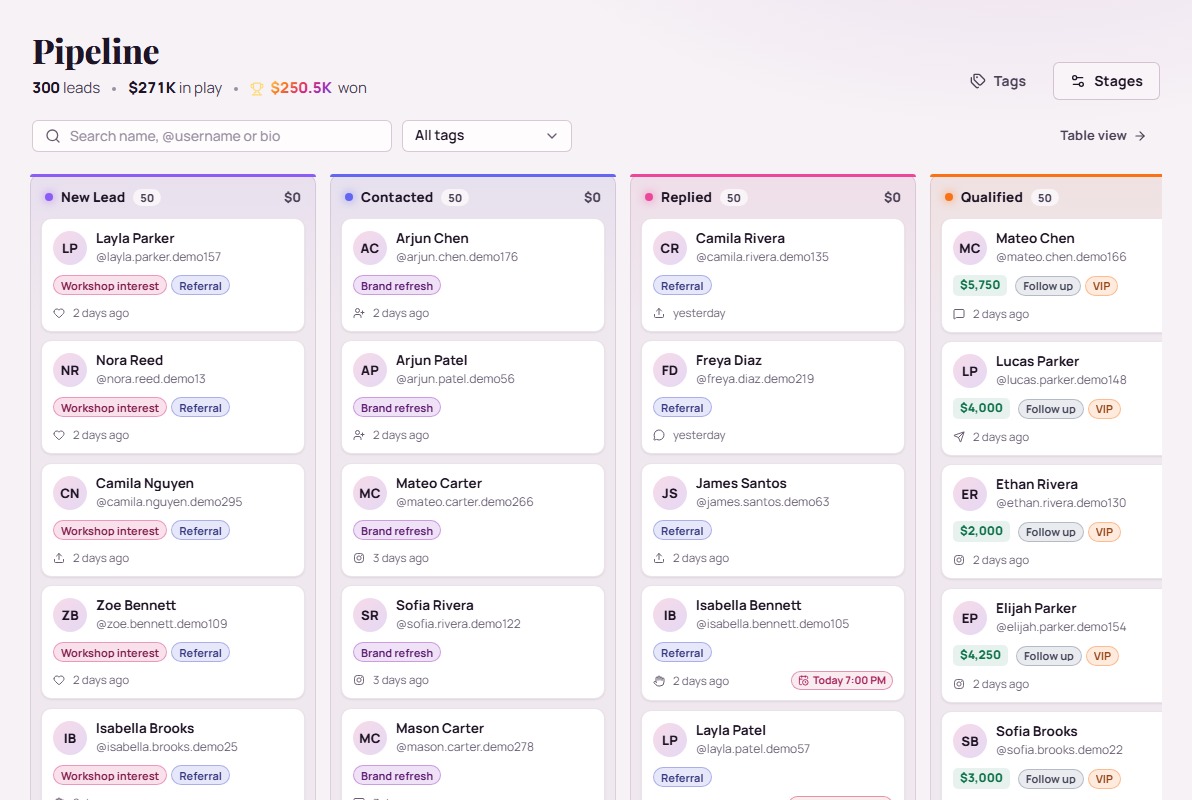
Track Instagram leads from first conversation to outcome
Use a clear stage to show where a relationship stands. GramFather starts with New Lead, Contacted, Replied, Qualified, Won and Lost. Open Pipeline → Stages to adapt names and order to your process. The first Open stage receives new contacts; Won stages count as conversions in Analytics.
For a consultation-based business, “Qualified” might mean the person has described a need you can help with and agreed to discuss an appointment. Write your definition down and apply it consistently. Moving a card records your team’s assessment; it does not verify payment or cause a sale.
Choose an Instagram CRM around five daily jobs
- Find the right person. Search by name, username or bio, then use tags to narrow the board.
- Recover the context. Read the contact’s notes and activity before continuing the conversation.
- Record the next action. Keep the next move and due date with the person so a follow-up has a purpose.
- See the pipeline. Move the contact to the stage that reflects the latest conversation.
- Review outcomes. Compare qualified opportunities, wins and recorded deal values over time.
During your trial, walk one real relationship through these steps. Check how quickly you can find the context again the next day. The CRM buying guide gives you a fuller evaluation checklist.
Bring existing contacts into your Instagram workflow
Start by selecting the correct Instagram account in the sidebar. Existing contacts can be brought in through Contacts → Import CSV. Check the import screen’s field mapping and preview before completing an import. Use the Contacts help guide for current import instructions.
On Pipeline, click Tags to create a label, then apply it to the appropriate contacts. A useful tag might identify an interest such as Coaching or a source such as Workshop. Keep stage names for sales progress and tags for categories; this makes filters easier to understand.
See the CRM before choosing your plan
The Instagram CRM video tutorial demonstrates pipeline organization with fictional teaching contacts and a readable transcript. For exact controls, defaults and fixes, open the Pipeline help guide.
The full CRM is included in Starter at $9/month, Growth at $49/month and Pro at $99/month. Each starts with a card-required 14-day trial and renews at its stated monthly price afterward. Choose additional automation features around the work you need; AI provider usage is billed separately. Compare current plan allowances.
What should an Instagram CRM help you do?
A useful CRM gives each relationship a place and each opportunity a next step. When someone asks about your service, you should be able to record what they need, label the conversation, move the opportunity through your pipeline and return to the context before replying.
GramFather combines that relationship work with audience research, outreach, replies and content planning. It suits business owners who use Instagram to find customers and continue conversations over time.
Build a pipeline around your offer
- Define your stages. Use a sequence such as New lead, In conversation, Qualified, Offer sent and Won. Adapt these example stages to how you actually sell.
- Add context. Keep notes about the person’s goal, timing and the offer you discussed. Use tags to group contacts by interest or source.
- Choose the next move. Review follow-up work alongside the conversation. A useful next action might be answering a question or checking whether the prospect wants a proposal.
- Record the outcome. Track won deals and recorded deal values so you can connect activity with business results.
Example: a coach managing consultation enquiries
A prospective client asks about a coaching program. You add the contact to your pipeline, note their goal and tag their interest. After you answer their question, you update the stage and record the next action. When you return to the conversation, the relevant context is ready.
This is an illustrative workflow, not a customer result. The value comes from consistently recording the next step and following through.
Use your CRM alongside Instagram
The GramFather Instagram overlay puts supported contact tools and saved replies alongside your browsing workflow. The dashboard gives you a wider view of contacts, campaigns and outcomes. Browser actions use the GramFather Chrome extension and a signed-in Instagram session.
Start with the contacts and pipeline you need today. Connect your own AI provider when you want AI-assisted replies, research or content; provider usage is billed separately.
Set up your first account-specific pipeline
- Connect your Instagram account with the extension and select it in the portal.
- Open Leads → Pipeline. A new account starts with New Lead, Contacted, Replied, Qualified, Won and Lost.
- Open a contact to review its context, add a useful note and record a deal value when you have one.
- Move the card to the stage that describes the real conversation.
- Use Contacts for search, CSV import/export and bulk work, and Next moves for follow-up tasks.
- Reopen the contact to verify that its stage and next action are saved.
The board is scoped to the selected account; stages and tags are shared across your Instagram accounts. Read Pipeline help and follow the CRM video before importing a working list.
Use a worked pipeline record
The pipeline worksheet includes a clearly labeled fictional consultation example, stage definitions and an outcome log. Use it to define what qualifies an opportunity before comparing conversion rates. Recorded deal value represents the value you enter; reconcile actual revenue with your billing records.
Your questions, answered
Can I use GramFather to manage Instagram sales leads?
Yes. Organize contacts with stages, tags, notes, next actions and recorded deal values. Use the pipeline to review which conversations need a next step.
Can I customize my Instagram sales pipeline?
Yes. Open Pipeline → Stages to rename, recolor and reorder stages or add stages. The default stages are New Lead, Contacted, Replied, Qualified, Won and Lost.
Can I import an existing contact list?
Yes. Select the correct Instagram account, open Contacts → Import CSV, and follow the mapping and preview steps. The Contacts help guide describes the current fields and behavior.
Is the Instagram CRM included in Starter?
Yes. The full CRM is included in Starter at $9/month after the 14-day trial. A card is required for the trial; AI provider usage is billed separately.
How much does the GramFather CRM cost?
The full CRM is included in every GramFather plan, starting with Starter at $9 a month. Every plan starts with a 14-day free trial: a card is required, nothing is charged for 14 days, and you can cancel before then and pay nothing. AI provider usage is separate. See the plans and free trial page for current details.
Does a CRM automatically create sales?
A CRM helps you organize opportunities and follow through. Sales depend on your offer, audience, conversations and delivery. GramFather does not guarantee a sales result.
See this workflow in GramFather.
Explore instagram crm, see the real screens, and choose the plan that fits your business.
Put your next move into practice.
Start your 14-day free trial and put GramFather to work on the workflow that matters most to your business.
Start organizing my leadsStarter plan: free for 14 days, then $9/month. Card required, with a temporary authorization hold released immediately; cancel before day 15 and you pay nothing. Compare plans from $9/month. AI provider usage billed separately. Browser actions require the Chrome extension and an available Instagram session. How the free trial works.