

Choose the right messaging workflow
Outreach introduces your offer to a relevant audience. An autoresponder helps handle incoming conversations. Saved replies help you answer recurring questions consistently. A CRM records where the conversation should go next.
GramFather brings these jobs into one workspace. Choose the workflow that matches how the person found you and what they have asked for. A question about pricing deserves a clear pricing answer; an exploratory conversation may benefit from a qualifying question.
Prepare AI replies with useful context
- Describe your business. Add what you sell, who it helps and the details a prospect needs to make a decision.
- Set your voice. Give examples of replies you would actually send. Include the information that should be confirmed by a person.
- Connect your provider. AI features use your connected OpenRouter account and available provider credits.
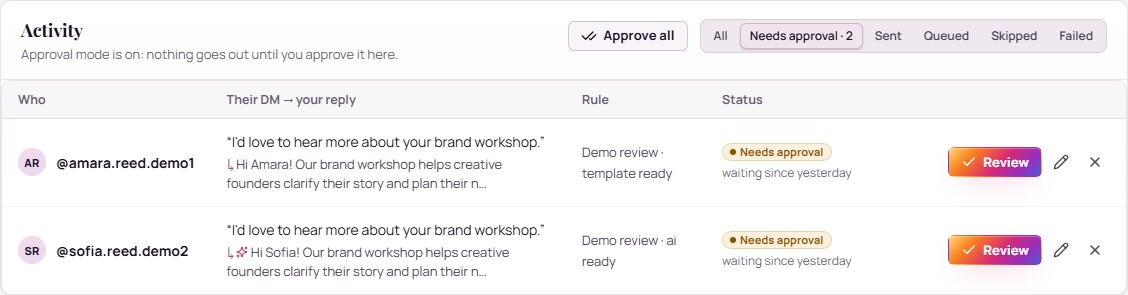
- Review early drafts. Use approval mode to check accuracy and tone before sending.
- Keep context in the CRM. Record the person’s interest and next action as the conversation develops.
A useful reply answers one question clearly
If someone asks whether your service fits a beginner, answer that question first. Then offer a relevant next step: “Yes, the starter program is designed for people building a routine. What would you most like to improve over the next month?” Adapt this illustrative example to the service you actually provide.
Keep claims, prices and availability current in your business context. Review the messages people receive as your offer changes.
Understand how actions run
GramFather uses a Chrome extension and signed-in Instagram session for browser actions. Keep the required browser session and computer available. Choose active hours, action limits and pauses for your workflow.
Instagram’s restrictions still apply. GramFather is an independent product and is not affiliated with Instagram or Meta. It does not promise unrestricted messaging or guaranteed account safety.
Your questions, answered
Can I approve AI messages?
Yes. Approval mode lets you review AI messages before they go out. The Instagram overlay also supports inserting a saved reply into the composer for you to send yourself.
Is AI usage included with a free account?
AI tools use your connected provider account. Provider usage and generation charges are separate from your GramFather account.
Put your next move into practice.
Create your free GramFather account and start with the workflow that matters most to your business.
Explore my messaging workspaceNo credit card required. Email and U.S. mobile verification. AI provider usage billed separately. Browser actions require the Chrome extension and an available Instagram session. View account details.