

Build an Instagram lead generation funnel around a useful offer
A practical funnel connects four steps: discovery, a useful conversation, qualification and an agreed next action. Start with the question your buyer wants answered. A photographer might explain how to prepare for a brand shoot; a coach might share a weekly planning exercise. These are illustrative offers you can adapt to your own expertise.
Make the next step explicit in the post or profile. When someone responds, answer their question, learn what they need and record the conversation. Use the lead magnet guide to shape the offer and the qualification guide to choose useful follow-up questions.
Choose a lead source you can explain
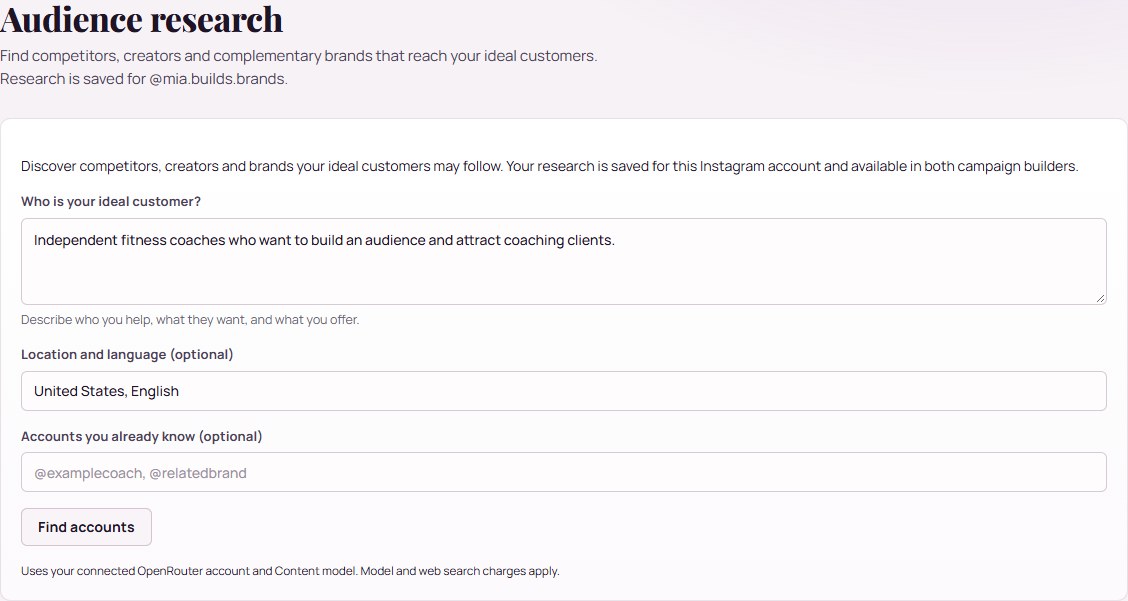
- Audience research
- Explore relevant accounts and review why they fit your market. Treat account suggestions as research to verify.
- Your post engagers
- Review the context of comments and likes, then choose an appropriate conversation workflow.
- New followers
- Use a relevant welcome to learn what someone is interested in. A follow is a starting signal; the reply gives you more context.
- Existing conversations
- Return to people who asked for information, using their recorded needs and agreed next step.
The audience research tutorial demonstrates how to investigate a niche. The DM automation page explains supported campaign triggers and review controls.
Use a simple qualification note
Keep four pieces of context with a lead: need, fit, timing and next action. For example: “Needs product photos; our studio covers the requested work; aiming for next month; send available dates after confirming the brief.” This is a sample note, not customer data.
Ask only for information that helps the conversation. Update the stage when the person’s answers support it. A useful weekly review looks at the quality of those conversations and whether agreed next actions were completed.
Calculate the funnel using your own numbers
Keep a consistent reporting period and define the denominator for every rate. Reply rate = people who replied ÷ people contacted × 100. Qualification rate among replies = qualified people ÷ people who replied × 100. Close rate = won opportunities ÷ qualified opportunities × 100. Only calculate a rate when its denominator is greater than zero.
If 100 people were contacted, 12 replied, four qualified and one became a customer, the example rates are 12%, about 33% and 25%. These are invented teaching numbers, not benchmarks or expected results. Allow enough time for conversations to mature before comparing periods. Try the lead funnel calculator with your own assumptions.
Use the CRM to organize the people behind the numbers. Campaigns require Growth or Pro; the CRM is included in every plan. See plans, trial terms and AI usage costs before starting.
Begin with a specific customer
Write down who you help, the outcome you provide, the market you serve and the signals that make someone a relevant prospect. For example: an independent fitness coach helping busy professionals build a sustainable training routine.
In GramFather, audience research uses your business context to suggest relevant creators, competitors and complementary brands. Review why an account fits and inspect the supporting search sources before using it as a campaign audience source. AI research requires your connected provider account.
Move from research to a reviewed campaign
- Choose an audience source. Start from relevant accounts or your own audience list.
- Review fit. Check that the people and context match your offer. A follower relationship is a research signal, not proof of buying intent.
- Prepare your introduction. Explain why you are reaching out and offer one useful next step.
- Set your workflow. Choose supported engagement and DM steps, active hours and action limits.
- Continue the conversation. Organize interested contacts in your CRM and use their replies to guide the next action.
Measure qualified conversations
Track reviewed prospects, conversations started, replies, qualified opportunities and won deals. A qualified opportunity is someone whose needs and timing fit your offer and who wants to discuss a next step.
For an illustrative example, 10 relevant replies from 100 introductions is a 10% reply rate. If three replies qualify for your offer, the qualified-opportunity rate is 3%. These are sample calculations, not GramFather benchmarks or expected results.
Match the workflow to the relationship
Someone who has asked about your offer needs a direct answer. Someone you have just discovered needs context and a respectful introduction. Prepare different messages for these situations, review AI drafts and honor requests to end a conversation.
Browser actions run through your connected Chrome extension. Instagram restrictions and rate limits apply; settings are workflow controls and do not guarantee that an account will avoid restrictions.
Carry one enquiry through a complete record
Start with a person’s actual request, record the source and the offer they asked about, then define the next useful answer. Use pipeline stages to distinguish a new enquiry from a qualified opportunity and a confirmed sale. Keep the permission and context of the conversation with the record.
The worked growth review demonstrates how audience counts and enquiry outcomes fit together using fictional data. It gives you a reproducible calculation and downloadable records to adapt to your own evidence.
Your questions, answered
How do I generate leads from Instagram?
Define your buyer and useful offer, create content or research relevant audiences, start an appropriate conversation, qualify interest and record an agreed next action. Evaluate qualified opportunities and customers alongside reach and follower counts.
What is an Instagram lead generation funnel?
It is the sequence from discovering your business to having a useful conversation, qualifying a need and agreeing on a sales next step. Define and measure each stage for your own offer.
Can I track Instagram leads in GramFather?
Yes. Use CRM stages, tags, notes and next actions to organize leads and record outcomes. Every plan includes the CRM; campaign automation requires Growth or Pro.
What metrics should I use for Instagram lead generation?
Track contacted people, replies, qualified opportunities and won opportunities within a defined period. State each rate’s denominator and distinguish recorded deal value from verified payment revenue.
Can I use my own audience list?
GramFather supports campaign workflows using your own audience list or relevant audience sources. Review the source and the people you intend to contact before running the campaign.
What should I track after someone replies?
Record their need, qualification, current stage and next action in your CRM. Review qualified opportunities and won deals alongside reply counts.
See this workflow in GramFather.
Explore instagram lead generation, see the real screens, and choose the plan that fits your business.
Put your next move into practice.
Start your 14-day free trial and put GramFather to work on the workflow that matters most to your business.
Build my first lead workflowPro plan: free for 14 days, then $99/month. Card required, with a temporary authorization hold released immediately; cancel before day 15 and you pay nothing. Compare plans from $9/month. AI provider usage billed separately. Browser actions require the Chrome extension and an available Instagram session. How the free trial works.